
Duration 2h 10m Project Files Included MP4

Title: Udemy – Adobe Illustrator for Digital Pattern Drafting
Info:
What you’ll learn
Navigate Adobe Illustrator confidently and identify the essential tools and panels used for digital pattern drafting.
Navigate Adobe Illustrator confidently and identify the essential tools and panels used for digital pattern drafting.
Draft an accurate basic front torso block in Adobe Illustrator using body measurements and established drafting principles.
Construct darts and trace basic bodice pattern pieces, applying appropriate bust and waist shaping techniques.
Perform basic dart rotation on the basic torso block
Adobe Illustrator for Digital Pattern Drafting: From Basics to Bodice Blocks
Learn to create accurate, reusable digital sewing patterns using Adobe Illustrator, even if you’ve never used the software before!
Are you a fashion designer or manual pattern maker looking for a faster, more efficient way to create sewing patterns? Or perhaps you’ve been wanting to learn digital pattern drafting but don’t know where to begin?
This course is designed to help you make that transition with confidence.
Adobe Illustrator is a powerful tool for digital pattern drafting, but knowing how to use the software is only the beginning. The real skill is understanding how to apply its tools to create accurate sewing patterns.
That’s exactly what I’ll teach you in this course.
We’ll start from the basics, getting familiar with the Adobe Illustrator interface and learning the essential tools and functions used in digital pattern drafting. You’ll learn how to draw precise lines and smooth curves, edit paths, rotate and reflect shapes, duplicate pattern pieces, and cut and join paths.
But we won’t stop at learning the tools.
You’ll put everything you’ve learned into practice by drafting an actual basic torso pattern block from scratch.
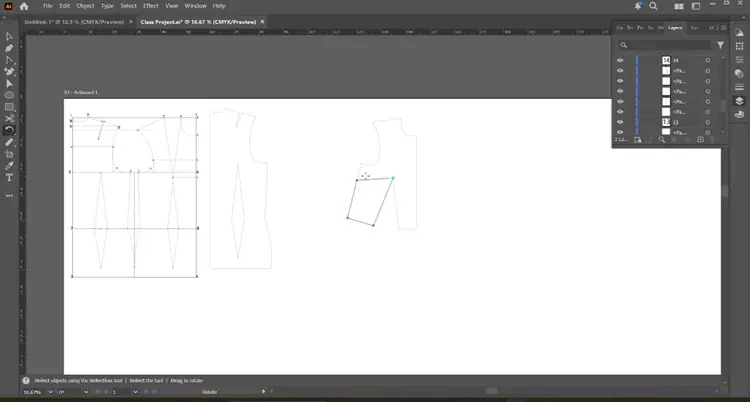
I’ll guide you step by step through the drafting process, showing you how to translate body measurements into accurate digital patterns. You’ll then learn how to trace out your basic sloper, refine your pattern pieces, and rotate darts from one position to another while maintaining the intended fit of your bodice.
By the end of this course, you’ll have more than a basic understanding of Adobe Illustrator. You’ll have practical digital pattern drafting skills and your own editable pattern blocks that you can continue working with.
What You’ll Learn
Navigate Adobe Illustrator and customize your workspace for digital pattern drafting.
Use essential tools to draw accurate straight lines, curves, and pattern shapes.
Perform basic drafting operations such as copying, duplicating, rotating, reflecting, cutting, and joining paths.
Work with measurements and manipulate pattern shapes accurately.
Draft a basic torso pattern block using Adobe Illustrator.
Trace out basic slopers from your drafted block.
Rotate darts from one position to another on a basic bodice block.
Refine and save editable digital patterns for future use.
Who Is This Course For?
This course is ideal for manual pattern makers who want to transition to digital drafting, fashion designers who want more control over their pattern development process, fashion students, aspiring digital pattern makers, and sewing enthusiasts looking to expand their skills.
You don’t need any previous experience with Adobe Illustrator. I’ll guide you through the essential tools and operations before we begin drafting actual patterns.
Why Learn With Me?
I’m Sarah, a professional digital pattern maker with experience developing patterns for fashion brands, including designs showcased at New York Fashion Week.
Through my work, I’ve seen how digital pattern drafting can improve accuracy, simplify pattern adjustments, and make it easier to organize and reuse patterns.
My goal is to help you develop practical skills you can apply to your own fashion projects and eventually build on for professional pattern development.
That’s why this course focuses on hands-on demonstrations rather than software theory alone. You’ll see how each tool works and, more importantly, how to use it when drafting sewing patterns.
What Will You Achieve?
By the time you complete this course, you should be able to open Adobe Illustrator, set up your workspace, and use its essential tools to draft basic digital patterns with greater confidence.
You’ll also have your own basic torso block and traced sloper, which you can save, edit, and reuse as you develop more advanced pattern drafting skills.
These foundational skills will prepare you for the next stage of digital pattern development, where you’ll learn to manipulate darts, create style lines, introduce fullness, and transform basic blocks into different garment designs.
Your journey into digital pattern drafting doesn’t have to be complicated. You just need the right foundation and a clear, practical approach to learning.
Whether you’re looking to improve your personal workflow, modernize your pattern drafting process, or develop skills for future freelance opportunities, this course is a great place to start.
Enroll today, and let’s start creating accurate digital sewing patterns together!
Who this course is for:
Manual Pattern Makers: Professionals who want to transition from traditional paper patterns to accurate, efficient digital pattern drafting.
Fashion Designers: Designers who want to develop their own digital sewing patterns and gain greater control over their design development process.
Aspiring Digital Pattern Makers: Beginners looking to build a solid foundation in digital pattern drafting and develop skills for future professional opportunities.
Fashion Entrepreneurs and Brand Owners: Individuals who want to understand digital pattern development, improve pattern consistency, and streamline their garment production workflow.
Sewing Enthusiasts and Dressmakers: Individuals who want to expand their technical skills and learn how to create reusable digital sewing patterns.
Freelance Pattern Makers: Professionals looking to expand their services by incorporating digital pattern drafting into their workflow.


https://rg.to/file/10f911c3673882cde192ca66a30ef7d7/UdemyAdobeIllustratorforDigitalPatternDrafting.part4.rar.html
https://rg.to/file/20e9e978d92451ed8262b0a76504ce02/UdemyAdobeIllustratorforDigitalPatternDrafting.part2.rar.html
https://rg.to/file/e1b2e74112441b8ba6ebcbd698fd47d2/UdemyAdobeIllustratorforDigitalPatternDrafting.part1.rar.html
https://rg.to/file/0156d6e9f850c6971a80f290e32e6395/UdemyAdobeIllustratorforDigitalPatternDrafting.part3.rar.html

https://alfafile.net/file/AXRhD
https://alfafile.net/file/AXRht
https://alfafile.net/file/AXRhM
https://alfafile.net/file/AXRh5

https://nitroflare.com/view/EADBFC023B81BB7/UdemyAdobeIllustratorforDigitalPatternDrafting.part1.rar
https://nitroflare.com/view/6B06EDD32E85B85/UdemyAdobeIllustratorforDigitalPatternDrafting.part2.rar
https://nitroflare.com/view/0FCD52AD0407EA5/UdemyAdobeIllustratorforDigitalPatternDrafting.part3.rar
https://nitroflare.com/view/9640042F3850C77/UdemyAdobeIllustratorforDigitalPatternDrafting.part4.rar




