
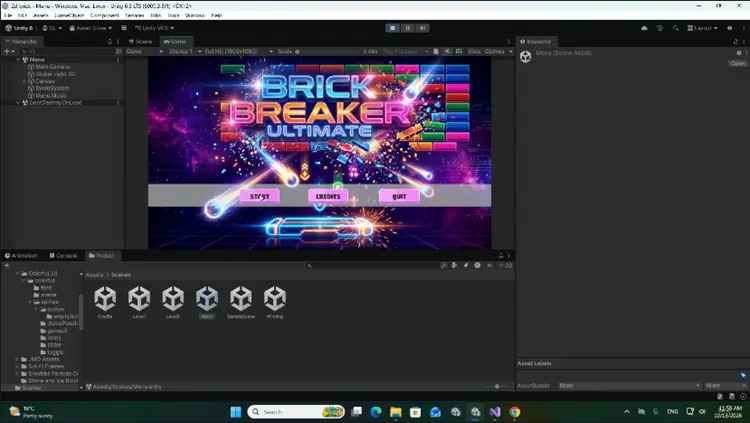
Duration 4h 27m Project Files Included MP4

Title: Udemy – Unity 2D Game Development : Build a Brick Breaker Game
Info:
What you’ll learn
Unity Engine Essentials: Navigate the Unity editor, manage scene hierarchies, and organize game assets efficiently.
C# Scripting from Scratch: Write clean, readable C# scripts to handle game logic, player input, state management, and score tracking.
2D Physics & Collisions: Master Rigidbody2D, physics materials, velocity locks, and collision events for smooth ball physics.
Core Game Mechanics: Program responsive paddle controls, brick health systems, dynamic level layouts, and game loop state changes.
Power-Ups & Special Effects: Implement dropping power-up items, particle visual effects, and screen shake for high juice and polish.
Game UI & Audio Management: Build functional UI overlays, main menus, restart buttons, and integrate background music and sound effects.
Have you always wanted to create your own video games but didn’t know where to start? Unity 2D & C# Game Development: Build a Brick Breaker Arcade Game is the ultimate beginner-friendly project course designed to take you from a complete novice to a confident 2D game developer.
Instead of getting bogged down in endless theoretical lectures, this course uses a 100% hands-on, project-based approach. You will learn core C# programming concepts and Unity engine mechanics by step-by-step building, polishing, and completing a modern, fully functional Brick Breaker style arcade game.
Learn C# and 2D Physics Step-by-Step
Throughout this course, you will master the foundational pillars of 2D game development in Unity. You will start by setting up your development environment, creating your game scene, and writing clean C# code to control player movement. From there, you will dive deep into Unity’s 2D Physics system, learning how Rigidbody2D and Collider2D components handle realistic bounce trajectories, velocity control, and precise collision detection.
You won’t just build a basic prototype—you will craft a polished, publishable game. We cover advanced gameplay elements like dynamic brick layout grids, particle effects for satisfying destruction, custom drop-rate power-ups (like paddle expanders and multi-ball drops), sound effects, scoring systems, and complete UI game menus (Start, Pause, and Game Over screens).
Why Learn Unity 2D Development?
Unity is the industry-standard game engine used by top indie studios and AAA developers worldwide. Mastering Unity 2D opens the door to creating mobile games, desktop titles, and web-based games. By focusing on a classic Brick Breaker game, you gain a versatile skill set that directly applies to almost any 2D arcade, puzzle, or platformer game you build in the future.
What You Will Learn
Unity Engine Essentials: Navigate the Unity editor, manage scene hierarchies, and organize game assets efficiently.
C# Scripting from Scratch: Write clean, readable C# scripts to handle game logic, player input, state management, and score tracking.
2D Physics & Collisions: Master Rigidbody2D, physics materials, velocity locks, and collision events for smooth ball physics.
Core Game Mechanics: Program responsive paddle controls, brick health systems, dynamic level layouts, and game loop state changes.
Power-Ups & Special Effects: Implement dropping power-up items, particle visual effects, and screen shake for high juice and polish.
Game UI & Audio Management: Build functional UI overlays, main menus, restart buttons, and integrate background music and sound effects.
Requirements
A computer (Windows, macOS, or Linux) capable of running Unity.
Unity 2022 LTS or newer (completely free to download).
No prior C# programming or Unity experience is required—everything is explained step-by-step!
Who This Course Is For
Absolute Beginners: Anyone who wants to start making games in Unity without getting overwhelmed by complex math or code.
Aspiring Indie Developers: Creators looking to learn practical 2D game architecture through a complete, hands-on project.
C# Beginners: Programmers looking for an engaging, visual way to apply C# coding principles to game design.
Who this course is for:
Absolute Beginners: Anyone who wants to start making games in Unity without getting overwhelmed by complex math or code.
Aspiring Indie Developers: Creators looking to learn practical 2D game architecture through a complete, hands-on project.
C# Beginners: Programmers looking for an engaging, visual way to apply C# coding principles to game design.


https://rg.to/file/af967c53c2846cf1e4e9ae37851fa5d6/UdemyUnity2DGameDevelopmentBuildaBrickBreakerGame.part2.rar.html
https://rg.to/file/1a4c35917dfff0c2cdfacb29896d09d9/UdemyUnity2DGameDevelopmentBuildaBrickBreakerGame.part1.rar.html
https://rg.to/file/3eef22e7d334ed235c3dfe68b7826aad/UdemyUnity2DGameDevelopmentBuildaBrickBreakerGame.part4.rar.html
https://rg.to/file/19014656ffe98244d0a59153aa748455/UdemyUnity2DGameDevelopmentBuildaBrickBreakerGame.part3.rar.html
https://rg.to/file/ac520c4b52d02138932c5ff176966de5/UdemyUnity2DGameDevelopmentBuildaBrickBreakerGame.part6.rar.html
https://rg.to/file/b415f50298189126b30e647aa8045748/UdemyUnity2DGameDevelopmentBuildaBrickBreakerGame.part5.rar.html

https://alfafile.net/file/AXGdF
https://alfafile.net/file/AXGd4
https://alfafile.net/file/AXGdw
https://alfafile.net/file/AXGd3
https://alfafile.net/file/AXGdC
https://alfafile.net/file/AXGdd

https://nitroflare.com/view/DF6C42A1552C15C/UdemyUnity2DGameDevelopmentBuildaBrickBreakerGame.part1.rar
https://nitroflare.com/view/D6D71E07625EBCB/UdemyUnity2DGameDevelopmentBuildaBrickBreakerGame.part2.rar
https://nitroflare.com/view/23A4E76974FB50A/UdemyUnity2DGameDevelopmentBuildaBrickBreakerGame.part3.rar
https://nitroflare.com/view/7CAA1EFE12F56F9/UdemyUnity2DGameDevelopmentBuildaBrickBreakerGame.part4.rar
https://nitroflare.com/view/CA1000F501FAC0F/UdemyUnity2DGameDevelopmentBuildaBrickBreakerGame.part5.rar
https://nitroflare.com/view/17912823EEEAD36/UdemyUnity2DGameDevelopmentBuildaBrickBreakerGame.part6.rar




