
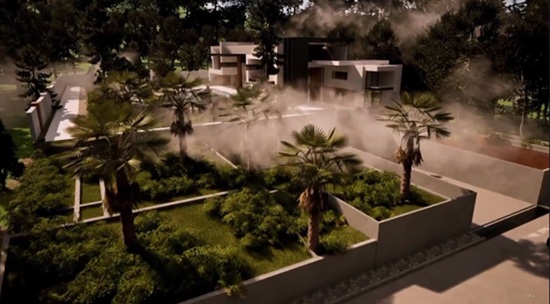
Duration 5h 46m MP4

Title: Udemy – Twinmotion: Complete Course for Architectural Visualization
Info:
What you’ll learn
Create professional architectural visualizations using Twinmotion from scratch.
Learn professional import workflows using Datasmith and other methods to bring 3D models into Twinmotion.
Build realistic materials for both exterior and interior architectural scenes.
Master lighting, environment, weather, HDRI, and camera settings for high-quality results.
Use vegetation painting and Twinmotion assets to create realistic outdoor environments.
Create high-quality architectural renders with professional render settings.
Produce smooth architectural animations using View Sets and animation tools.
Create immersive Panorama Sets for interactive architectural presentations.
Optimize your workflow to produce high-quality visualizations faster and more efficiently.
Complete real-world architectural projects from import to final presentation in Twinmotion.
Twinmotion: Complete Course for Architectural Visualization
Build Professional Architectural Visualizations with Twinmotion
Welcome to Twinmotion: Complete Course for Architectural Visualization, a comprehensive, step-by-step course designed to help you master one of the most powerful real-time architectural visualization tools available today.
Whether you’re an architect, interior designer, landscape designer, architecture student, or 3D visualization artist, this course will teach you how to transform your 3D models into stunning architectural presentations with speed, efficiency, and professional-quality results.
Unlike many courses that simply introduce the software, this course follows a complete real-world workflow. You’ll learn not only how each tool works, but also when and why to use it throughout an architectural visualization project.
The course starts with the fundamentals and gradually progresses to more advanced techniques, making it suitable for both complete beginners and users who already have some experience with Twinmotion.
What You’ll Learn
By the end of this course, you’ll be able to:
Import projects into Twinmotion using Datasmith and other professional import workflows.
Create realistic materials for both exterior and interior architectural scenes.
Design beautiful outdoor environments using Vegetation Painting and Twinmotion’s extensive asset library.
Master environment settings, including sunlight, sky, HDRI, weather, ambience, and atmospheric effects.
Configure professional camera settings to create more cinematic architectural presentations.
Apply visual effects such as Fog Cards, Static Motion Blur, and Parallax Windows.
Create realistic interior lighting using practical and efficient workflows.
Produce high-quality architectural renders with optimized render settings.
Create smooth architectural animations using View Sets and Twinmotion’s animation tools.
Build immersive Panorama Sets for interactive architectural presentations.
Course Structure
The course is organized into 5 carefully designed sections, following a professional architectural visualization workflow.
Section 1 – Introduction
Start by understanding Twinmotion, its workflow, and installing the software.
Section 2 – Importing & Project Setup
Learn professional methods for importing and preparing projects using Datasmith and other workflows.
Section 3 – Exterior Scene
Build a complete exterior visualization by working with materials, vegetation, environment settings, cameras, visual effects, and render settings.
Section 4 – Interior Scene
Learn professional workflows for creating interior materials, realistic lighting, scene optimization, and final rendering.
Section 5 – Animation
Create professional architectural animations, View Sets, and Panorama Sets for impressive client presentations.
Each lesson focuses on practical skills that you can immediately apply to your own architectural projects.
Why Learn Twinmotion?
Twinmotion provides an excellent balance between speed, simplicity, and visual quality.
Its real-time workflow enables architects and designers to create professional architectural visualizations much faster than traditional rendering methods while maintaining outstanding visual quality.
With support for Datasmith, a massive built-in asset library, realistic lighting, weather systems, animation tools, and an intuitive interface, Twinmotion has become one of the industry’s most popular architectural visualization solutions.
Who This Course Is For
This course is ideal for:
Architects
Interior Designers
Landscape Designers
Architecture Students
Architectural Visualization Artists
Anyone who wants to learn Twinmotion from scratch
Requirements
No previous Twinmotion experience is required.
Basic familiarity with architectural design or any 3D modeling software is helpful but not required.
A computer capable of running Twinmotion.
A willingness to learn and practice throughout the course.
By the End of This Course
After completing this course, you’ll have the confidence to create professional architectural visualizations, realistic renders, animations, and panorama presentations using Twinmotion.
More importantly, you’ll understand a complete production workflow that can be applied to real-world architectural projects, allowing you to produce high-quality presentations faster and more efficiently.
Note
All course content, demonstrations, projects, and instruction are created by the instructor. For international accessibility, the course narration is delivered using AI-assisted voice technology while preserving the instructor’s original teaching and workflow.
Who this course is for:
Architects who want to create professional architectural visualizations.
Interior designers looking to produce realistic renders and animations.
Landscape designers who want to visualize outdoor environments.
Architecture students who want to learn Twinmotion from scratch.
3D artists interested in real-time architectural visualization.
Professionals who want to present projects faster using Twinmotion.
Anyone interested in learning Twinmotion for architectural visualization.
Designers who want to improve their architectural presentation skills.
Beginners with little or no experience in Twinmotion.
Anyone who wants to create high-quality renders, animations, and panoramas with Twinmotion.


https://rg.to/file/8220c49a20b29775dcccc9171b4b9b97/UdemyTwinmotionCompleteCourseforArchitecturalVisualization.part3.rar.html
https://rg.to/file/e0e31731eda983ef53d7b793ec7b3ead/UdemyTwinmotionCompleteCourseforArchitecturalVisualization.part4.rar.html
https://rg.to/file/1c3fa74e102b3bbb8706ab9eb917c35f/UdemyTwinmotionCompleteCourseforArchitecturalVisualization.part2.rar.html
https://rg.to/file/245068ebf29bcefb5ceff74c7b108f88/UdemyTwinmotionCompleteCourseforArchitecturalVisualization.part1.rar.html
https://rg.to/file/21f2ac483e8e80430c323b95265610c5/UdemyTwinmotionCompleteCourseforArchitecturalVisualization.part7.rar.html
https://rg.to/file/010097f010eac756a6d3139845191434/UdemyTwinmotionCompleteCourseforArchitecturalVisualization.part5.rar.html
https://rg.to/file/88aaecc1d778934a45be29144f654938/UdemyTwinmotionCompleteCourseforArchitecturalVisualization.part6.rar.html

https://alfafile.net/file/ACAsv
https://alfafile.net/file/ACAs9
https://alfafile.net/file/ACAsQ
https://alfafile.net/file/ACAsx
https://alfafile.net/file/ACAsV
https://alfafile.net/file/ACAsU
https://alfafile.net/file/ACAsF

https://nitroflare.com/view/74983325598F2AE/UdemyTwinmotionCompleteCourseforArchitecturalVisualization.part1.rar
https://nitroflare.com/view/381D35264A910CA/UdemyTwinmotionCompleteCourseforArchitecturalVisualization.part2.rar
https://nitroflare.com/view/BE44EB593AD9FAF/UdemyTwinmotionCompleteCourseforArchitecturalVisualization.part3.rar
https://nitroflare.com/view/836B8123D99BEF7/UdemyTwinmotionCompleteCourseforArchitecturalVisualization.part4.rar
https://nitroflare.com/view/17BDB6CE971C821/UdemyTwinmotionCompleteCourseforArchitecturalVisualization.part5.rar
https://nitroflare.com/view/6D6C89BED0A60AB/UdemyTwinmotionCompleteCourseforArchitecturalVisualization.part6.rar
https://nitroflare.com/view/7B3D91D0E7CB499/UdemyTwinmotionCompleteCourseforArchitecturalVisualization.part7.rar




