
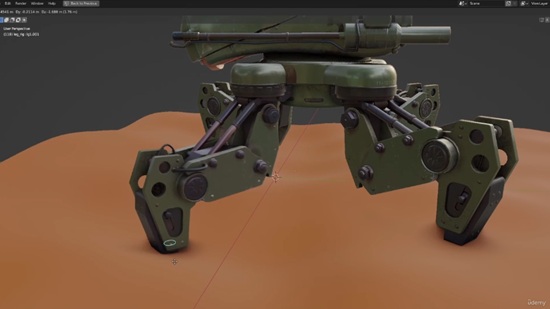
Duration 1h 20m Project Files Included MP4

Title: Udemy – Mechanical Rigging in Blender: Battle Drone
Info:
What you’ll learn
Learn Mechanical Rigging Techniques in Blender
Master Weight Binding for Mechanical objects
Create a Ground Detection system
Understand precise bone orientation and constraints for flawless mechanical movement
If you’ve ever tried rigging a mechanical model in Blender, you know the pain:
hard-surface meshes that bend instead of staying solid
joints that twist the wrong way
Pistons that break
And a rig that looks simple but becomes a mess once you animate it
Don’t spend weeks trying “to reinvent the piston” :) . Spend just 75 minutes with this course, and you’ll never rig mechanical joints the old way again.
Who This Course Is For
Blender artists who understand rigging basics, but want to rig mechanical models properly.
What to expect
This is not a 10-hour, theoretical course bloated with filler. Instead, it is a compact workflow you can start using today. You get a laser-focused workflow that’s practical, fast and applicable to your own models.
You’ll follow along with a real mechanical model and learn not just what buttons to press but why each step is important.
Here is what you’ll learn in just 5 lessons.
PART 1
Preparing Mechanical Models for Rigging: Learn how to split, organize, and orient mechanical meshes so rigging is simple and predictable.
PART 2
Clean Bone Structure for Mechanical Parts: Learn how to control the joints so that they rotate like real machinery: only on the desired axes.
PART 3
Setting Up IK That Feels Natural and Easy to Animate: Control the entire leg using one IK controller while the joint alignment always stays correct (no manual adjustments required).
Realistic Piston Movement: Rig functional pistons that expand and contract correctly (very satisfying to animate).
Ground Detection: The leg reacts to the ground on its own using simple constraints (no heavy simulations).
PART 4
Applying the same Leg Rig to All 4 Legs: Quick workflow to copy the one fully set-up leg rig and align it cleanly to all legs (no need to rebuild the leg rig).
PART 5
Rigging the Body + Flamethrower Turrets with simple, animator-friendly controls.
By the end, your mech will be fully rigged and ready for animation.
What You Get
Full Step-by-step video course (5 lessons, 1h15m)
The mech model + prepared files + my progress files
Fully rigged final file to study
Ready to Rig some Mechs?
Let’s Go!
Who this course is for:
Blender artists who want to add mechanical rigging techniques to their toolkit


https://rg.to/file/b041686602ba9836e3ae4f3f15908f8e/UdemyMechanicalRigginginBlenderBattleDrone.part2.rar.html
https://rg.to/file/6e8aa20d75426a66bd185c8ea05aa679/UdemyMechanicalRigginginBlenderBattleDrone.part3.rar.html
https://rg.to/file/b4998d1d2585a92f3bffc9ecff292366/UdemyMechanicalRigginginBlenderBattleDrone.part4.rar.html
https://rg.to/file/6d0f7e7f3c7dbc613106298ede3605e2/UdemyMechanicalRigginginBlenderBattleDrone.part1.rar.html
https://rg.to/file/adfa09a220fa71862b1c2e7585bb0292/UdemyMechanicalRigginginBlenderBattleDrone.part5.rar.html

https://alfafile.net/file/AwLiz
https://alfafile.net/file/AwLiH
https://alfafile.net/file/AwLiR
https://alfafile.net/file/AwLic
https://alfafile.net/file/AwLcf

https://nitroflare.com/view/EA0CE2682C8EE31/UdemyMechanicalRigginginBlenderBattleDrone.part1.rar
https://nitroflare.com/view/7191455CA8C5081/UdemyMechanicalRigginginBlenderBattleDrone.part2.rar
https://nitroflare.com/view/30477308C08C23C/UdemyMechanicalRigginginBlenderBattleDrone.part3.rar
https://nitroflare.com/view/A7A5578E9847AC2/UdemyMechanicalRigginginBlenderBattleDrone.part4.rar
https://nitroflare.com/view/2284ED40C4E6FC7/UdemyMechanicalRigginginBlenderBattleDrone.part5.rar

https://send.now/awstguxlwxo2
https://send.now/civq6utduux5
https://send.now/5b9ca0149aby
https://send.now/xfkqhmbaf0ge
https://send.now/36dsztmjtnsn





