
Duration 6h 18m Project Files Included MP4

Title: FXPHD – MAR202 – Hard Surface and Creature Texturing
Info:
Centred on real-world production workflows, this course demonstrates how to construct modular, node-based texturing setups in Mari for hard surface and organic models, equipping artists with advanced techniques to improve consistency, adaptability, and pipeline integration. Covering the entire process from reference gathering and planning through to export and lookdev handoff, it’s a practical guide to building textures that meet the demands of modern VFX pipelines.
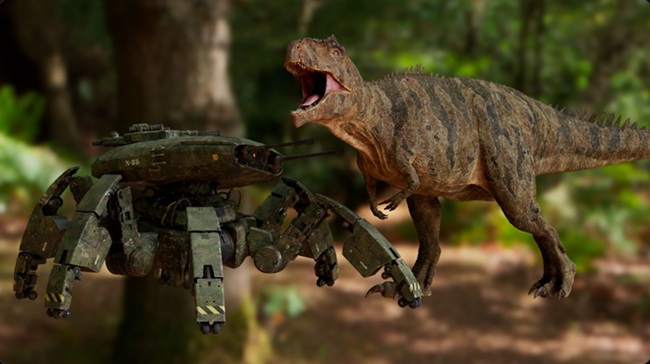
Throughout the course, you’ll texture two production-style assets: a sci-fi robot and an organic dinosaur. You’ll cover everything from building mood boards and extracting utility maps in Substance Painter to advanced Mari node graph setups, realistic material breakup, and export strategies tailored for downstream departments. The course wraps with a basic lookdev preview in Maya and Arnold to ensure everything works in context.
Your professor, Nastasia Bois, is a senior texture artist based in London. With 12 years of experience across animation, advertising, and high-end VFX, she’s worked on a wide range of assets, from props and environments to detailed creature work for studios such as TeamTO, Milk VFX, and ILM. She specialises in creature texturing and brings a deep understanding of technical workflows and artistic storytelling to this course.
The course features 10 in-depth classes and is packed with production-relevant techniques:
Class 1: References & Utility Maps
Covers the role of reference material in planning a texture workflow. The concept is analysed to define material groupings and required maps for lookdev. Utility maps, including AO, curvature, and surface detail, are extracted using Substance Painter.
Class 2: Mari Project Setup for Robot Asset
Covers the setup of a clean, organised Mari project for the creature asset. Includes building the node graph, importing and adjusting utility maps, and configuring material masks and output channels. Features the use of bake points and teleport nodes to streamline the workflow.
Class 3: Initial Texture Pass
Introduces the first clean texture pass for each material. Focuses on refining masks, balancing colour and shading, and ensuring visual consistency with the original concept.
Class 4: Breaking the 3D Look
Covers techniques for adding realism by breaking the clean CGI aesthetic. Includes the use of dust, dirt, scratches, and texture variations to integrate the model more naturally into its environment.
Class 5: Final Checks & Export
Completes the hard surface workflow by reviewing all outputs, validating mask utility for lookdev, and exporting final texture maps. Includes a basic pre-lookdev render to confirm asset readiness.
Class 6: Creature References & Utility Maps
Begins the creature workflow by breaking the model into material zones based on the concept design. Covers building targeted mood boards, establishing a reference-driven approach, and addressing early-stage planning challenges. Utility maps are extracted in Substance Painter, with a flood fill map generated in Substance Designer.
Class 7: Mari Setup for Creature Asset
In this class, we are going to set up our creature scene. Building a clear tree in Mari, importing all of our utility maps, fixing them when needed and then setup everything so we’ll have an easy space to work in, using bake point and other teleport nodes. We will also prepare all our material’s masks and output channels.
Class 8: Skin Texturing
Focuses on texturing the creature’s main and belly skin, creating a complete set of maps including diffuse, specular, roughness, bump, SSS, and SSS weight. Demonstrates how to incorporate cavity maps from modelling and generate additional detail procedurally. The class builds a full node graph in Mari, using foundational nodes and techniques to introduce variation and realism.
Class 9: Mouth, Teeth, Claws & Eyes
Covers the remaining components of the creature asset, including the mouth, teeth, claws, and eyes. Follows a full texture workflow for each part, with particular focus on SSS maps and the addition of a normal map for the eyes. Concludes with a visual check to ensure all elements blend cohesively.
Class 10: Final Detail Pass, Export & Renders
Applies a final layer of surface detail to the creature, including dead skin, dirt, dust, and mud, to enhance realism and environmental integration. Discusses lookdev handoff considerations, highlighting the importance of well-structured masks for flexibility across artists and studios. Concludes with map exports and a pre-lookdev render in Maya.


https://rg.to/folder/8701714/FXPHD%20MAR202%20Hard%20Surface%20and%20Creature%20Texturing%20L.html

http://alfafile.net/folder/GCfS

https://nitroflare.com/view/AC80C2842D1C899/FXPHDMar202HardSurfaceandCreatureTexturing.part01.rar
https://nitroflare.com/view/10C7022F4D173E1/FXPHDMar202HardSurfaceandCreatureTexturing.part02.rar
https://nitroflare.com/view/40AD7521630BA68/FXPHDMar202HardSurfaceandCreatureTexturing.part03.rar
https://nitroflare.com/view/E007A85BBCADBDE/FXPHDMar202HardSurfaceandCreatureTexturing.part04.rar
https://nitroflare.com/view/269081DA89A46AE/FXPHDMar202HardSurfaceandCreatureTexturing.part05.rar
https://nitroflare.com/view/45E6A432BBFD69D/FXPHDMar202HardSurfaceandCreatureTexturing.part06.rar
https://nitroflare.com/view/ED5C116A082F459/FXPHDMar202HardSurfaceandCreatureTexturing.part07.rar
https://nitroflare.com/view/2F7AA0AF78CF3B1/FXPHDMar202HardSurfaceandCreatureTexturing.part08.rar
https://nitroflare.com/view/401BB406FDDFC7C/FXPHDMar202HardSurfaceandCreatureTexturing.part09.rar
https://nitroflare.com/view/2738F98F7F34571/FXPHDMar202HardSurfaceandCreatureTexturing.part10.rar

https://send.now/8kb74t6quldb
https://send.now/g4veqbok9i7q
https://send.now/x1kbadzia3sm
https://send.now/exrgmwf3959q
https://send.now/35om2hbis5du
https://send.now/sorfi148de0s
https://send.now/umuwp2jwlu32
https://send.now/9abi739jnc12
https://send.now/nu7vnarvfhzg





Hello, part 3 link is missing in Send.com.